

Leinweber Computer Science and Information Building
Building Hours: The Leinweber Computer Science and Information building is unlocked from 7 a.m. until 7 p.m. Monday through Friday, with access until midnight to all valid U-M MCard holders. From midnight to 7 a.m. and 24 hours daily on Saturdays and Sundays, access is restricted to UMSI and CoE faculty, staff, and students.
Exceptions to these hours are below:
From 7:00 pm to 7:00 am Monday through Friday and 24 hours daily on Saturdays and Sundays, access to UMSI spaces is restricted to UMSI faculty, staff and students.
Reporting Access Issues: If your MCard is not expired, and you are having trouble using it to access the Leinweber Building or our satellite locations, please email [email protected]. If you forget your MCard or Office Key, you will need to contact UMSI Facilities at [email protected] during normal business hours. Outside normal business hours you will need to call the DPSS non-emergency line (734)763-1131.
Requesting Help via Jira: To request help on items addressed in this document, you will need to open a ticket in Jira. You can do this by going to https://help.si.umich.edu/ (see screen shot of landing page below) or email your request to [email protected].
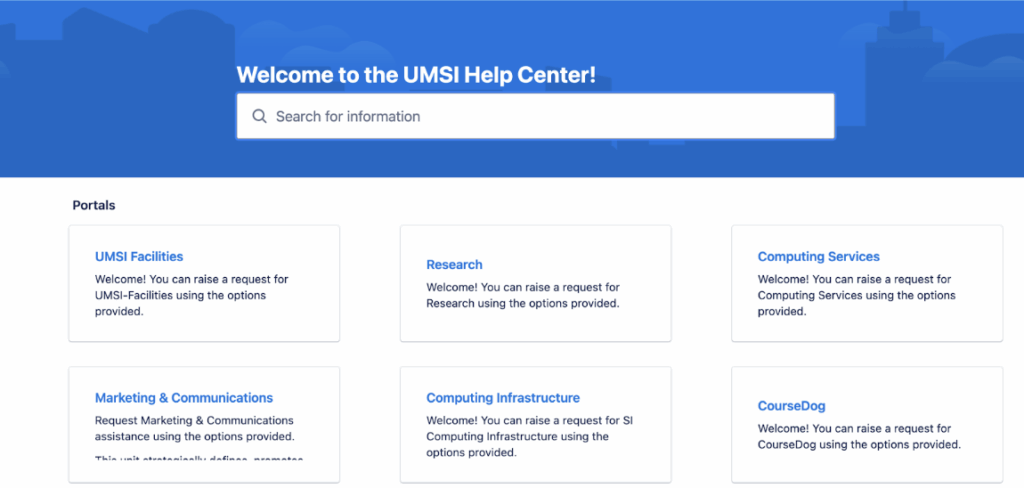
Provide as much detail in your help ticket or email as you can to assist the facilities team in identifying their next action to help resolve your facilities need or issue
1. General Room Reservation Policy
For room booking policies, see the UMSI Room Reservation System and Space Access Policy
2. Office Allocation Policy
Private Offices
Assigned based on job function.
Dedicated Offices or Desks
Eligible for staff working on-site 4–5 days/week, dependent on space and function.
Hot Desks / Shared Desks
For staff working on site 3 or fewer days/week or sharing a schedule with a colleague. Available on a flexible basis.
Request Process
All office-related requests must be submitted via a Jira ticket. When you submit a Jira ticket include the job function, work schedule and any other relevant information.
3. Personal/Nursing Room Use Policy
Room Location
Located on Floor 3, room 3563.
Room Features
- Fully enclosed and private with locking door
- Includes chair, table, electrical outlet, sink, and compact refrigerator
- Regularly cleaned and maintained
Eligibility & Use
- Open to all UMSI faculty, staff and students
- May be reserved or used on a drop-in basis (please limit time to 30 minutes unless more time is medically necessary)
Standards
- Clean up after each use
- Respect privacy—no unauthorized access while occupied
4. Reflection Room
A Reflection Room can be found on the second level, Room 2517 adjacent to the UMSI Student Lounge. This room is available on a walk-in basis for use by staff, students, and other members of the University community for prayer, meditation, or to have a quiet moment of reflection. The room includes an ablution station. The reflection room is accessible by MCard and open during normal building hours.
5. Mail
Incoming USPS Mail is received in the Dean’s Suite and distributed directly to offices. Campus Mail and Parcel Packages (UPS, FedEx) are delivered to the Beyster loading dock, picked up by designated staff and delivered directly to offices each day. Outgoing USPS and Campus Mail should be deposited in the labeled bins located in the Dean’s Suite. Outgoing parcel pick-up should be scheduled with UPS or FedEx and the parcel taken to the Beyster Building loading dock.
6. Reporting Issues or Making Requests
As a reminder: All space-related requests or maintenance issues should be submitted via Jira at https://help.si.umich.edu/ or emailing [email protected].
If you are having technical issues while in a classroom, and teaching you can press the Report Problem button on the touchscreen control panel to request a technician to come to the room.
If you are having technical issues in a conference room, you can get support by putting in a Jira ticket for computing services. If you need urgent support, please go to room 5149.
7. Lost and Found
The UMSI Dean’s Suite (third floor) is the place to report or turn in a lost/found item.